
Network activity
A complete list of the network calls MimicScribe makes, what each one carries, and how to inspect them.
The built-in Network Log
Settings → Network Log shows every request the app sends, as it happens — what it was for, where it went, the HTTP status, and how long it took.
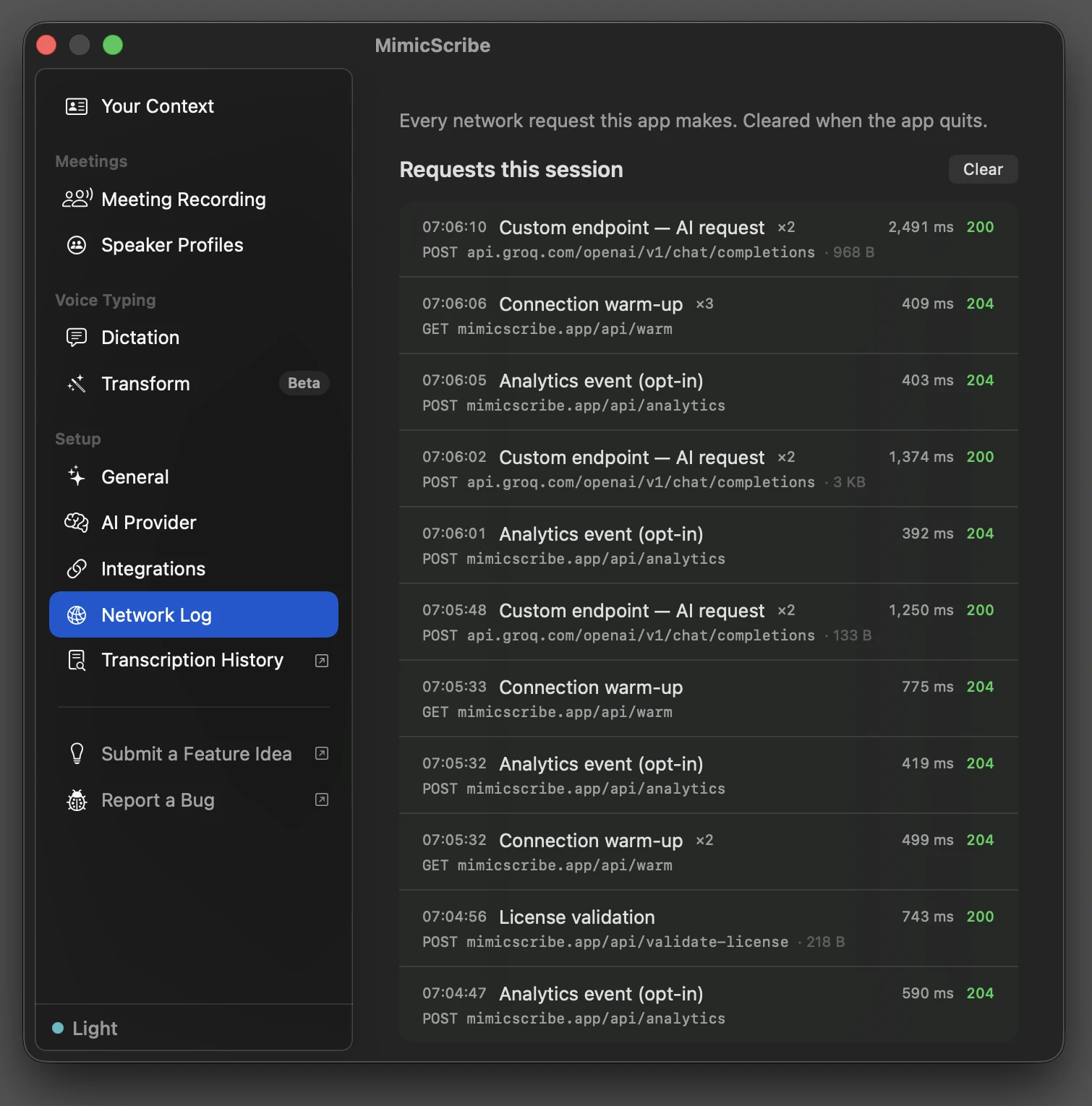
Each entry records metadata only: purpose, method, host and path, status, latency, and response size. Bodies, headers, and query strings are not recorded — a query string is where your own Gemini API key travels if you use one, so the log never holds anything worth protecting. The log lives in memory for the current session and clears when the app quits.
Two channels use their own networking and can’t appear in the log request-by-request: Sparkle update checks and model downloads. Both are disclosed in the pane’s “Where this app connects” card, and both are in the endpoint table below.
The log is the app’s own accounting. To check it against what actually crosses the wire, see Inspect it yourself.
Endpoints
| Host | When | What’s in it |
|---|---|---|
mimicscribe.app/api/gemini/... (Cloudflare) | Cloud meeting summary, talking points, Q&A, transform, dictation refinement | Transcript text and your prompt. Not raw audio. |
mimicscribe.app/api/warm | When a recording starts and periodically while one is active — only for features routed through the proxy | Empty GET — TLS handshake to shave latency off the first real call. |
mimicscribe.app/appcast.xml | At launch, then every 24h (Sparkle) | GET request. App + macOS version in the User-Agent. |
mimicscribe.app/api/crash-report | When a queued crash, daily hang/CPU metric, failure event, or degraded-transcript diagnostic exists, only if crash reporting is on (or you said Send after a crash) | Report type, app + build version, build channel, OS version, an anonymous device hash, a failure event’s name + categorical codes, and — for crashes — the exception name + top stack frames (function names + offsets). No exception reason strings, no transcript text, no audio. |
mimicscribe.app/api/validate-license | At launch and periodically, paid plans only | License key. Nothing else. |
mimicscribe.app/api/report-usage | Every ~15 min, paid plans only | Aggregate token counts per feature for billing. No transcript content. |
mimicscribe.app/api/free-usage | At launch, free tier only — seeds the local usage meter | Anonymous device hash, local date. |
mimicscribe.app/api/portal | When you click Manage Subscription, paid plans only | License key, exchanged for a short-lived Stripe billing-portal link that opens in your browser. |
mimicscribe.app/api/feedback/auth | When you open the feedback board from Settings | Your license identity, exchanged for a sign-in link to the board. No transcript content. |
generativelanguage.googleapis.com | Only with your own Gemini API key — the Custom endpoint preset, or a standalone key set up earlier | Transcript text and your prompt, sent directly to Google with your key. Bypasses our proxy. Warm-up and keep-alive pings go here too (a one-model list request), not to /api/warm. |
| Your custom endpoint | Only if configured in Settings → AI & Data | Transcript text for the features you routed there, plus warm-up and keep-alive pings (GET /models) while recording. Localhost endpoints skip the pings. |
| Your webhook URL | Only if you turn on the webhook in Settings → Integrations — when a meeting finishes, and again if you edit it | The one destination that carries meeting content to a third party you chose. Summary, action items, tags, and participant names. Never the transcript, and never an offline meeting. https only (localhost excepted); a Discord URL is reshaped into an embed. Optionally HMAC-signed with a secret you set. |
HuggingFace CDN (huggingface.co via CloudFront) | When MiniLM, Parakeet, and LocalVQE models load, a speech-model update downloads, or the speaker-refinement model downloads, while the app is idle | Manifest revision check. No user data. |
github.com | Only if you set up Import from URL — the yt-dlp helper and its checksum, then a weekly refresh check | A download from yt-dlp’s official release page, SHA-256 verified. No user data. Your own Homebrew copy, if you have one, is used instead and never touched. |
| The site you paste into Import from URL | When you import a meeting from a page rather than a direct media file | The helper contacts that site, and whichever host it serves media from, to fetch the audio. The request to the site you named is shown in the log; the media host it redirects to is not. |
An https link an agent hands to import_meeting | Only when you or an agent imports a meeting from a URL over MCP | A one-time download of that file. You supply the link. |
| Any URL you add as a reference or meeting-prep source | When you add a web URL under Settings → Meeting Recording → Reference Documents, or as prep for a meeting | A one-time GET of that page, fetched directly from its own host so its text can be indexed. You choose the URL; the fetched content is then processed via the Gemini proxy above. |
Audio capture, transcription (Parakeet), speaker diarization, echo cancellation, and VAD run on-device. Audio bytes are never sent anywhere.
This table is kept honest by a test rather than by memory: every hardcoded request host in the app source has to map to a row in the Network Log pane’s “Where this app connects” card, or the build fails. The card and this table are the same list.
The Gemini proxy is open source: github.com/mimicscribe/mimicscribe-proxy.
Inspect it yourself
The Network Log is self-reported — the app telling you what it sent. The tools below observe from outside the app, so you don’t have to take its word for it.
macOS ships nettop (live byte counters per process) and lsof (open sockets):
# Live view of every connection the app has open (press q to quit)
nettop -p mimicscribe

# One-time snapshot of its open sockets
lsof -i -nP -a -p $(pgrep -x mimicscribe)
For a UI alternative, Little Snitch ($69) prompts on each connection and works on macOS Tahoe. LuLu (free, by Objective-See) is the usual recommendation but currently has a NetworkExtension provider issue on Tahoe 26.2+ — verify it’s actually catching traffic before relying on it.
Offline meetings
An offline meeting skips every cloud feature. Transcription and speaker separation still run on your Mac. Cloud summaries and other AI features are skipped; you can add a summary later with AI on your Mac, or by turning Offline off for that meeting. What changes on the network:
- No
/api/gemini/...calls. No transcript leaves the Mac during or after the meeting. - No
/api/warmprewarm at meeting start. - No webhook POST. An offline meeting has no summary to send, so it isn’t sent — enrich one with “Generate Summary Now” if you want it to go out.
- Crash reporting is off by default; after a crash you’re asked before anything is sent.
appcast.xml and HuggingFace model checks are unchanged — they’re per-app, not per-meeting.
Run an offline meeting with the Network Log open and you can watch this hold: no AI requests appear for that meeting.