
Privacy & Security

Bring Your Own Endpoint
Ollama and LM Studio locally, your company's Foundry or Bedrock, or our Gemini proxy. Swap it anytime in Settings.

On-device Per Meeting
Turn it on for every meeting or just one. Transcription and speakers keep running on your Mac, and no text goes to a remote AI.

No Account
No sign-in, no email, no usage analytics. Pro is a license key, not an account.

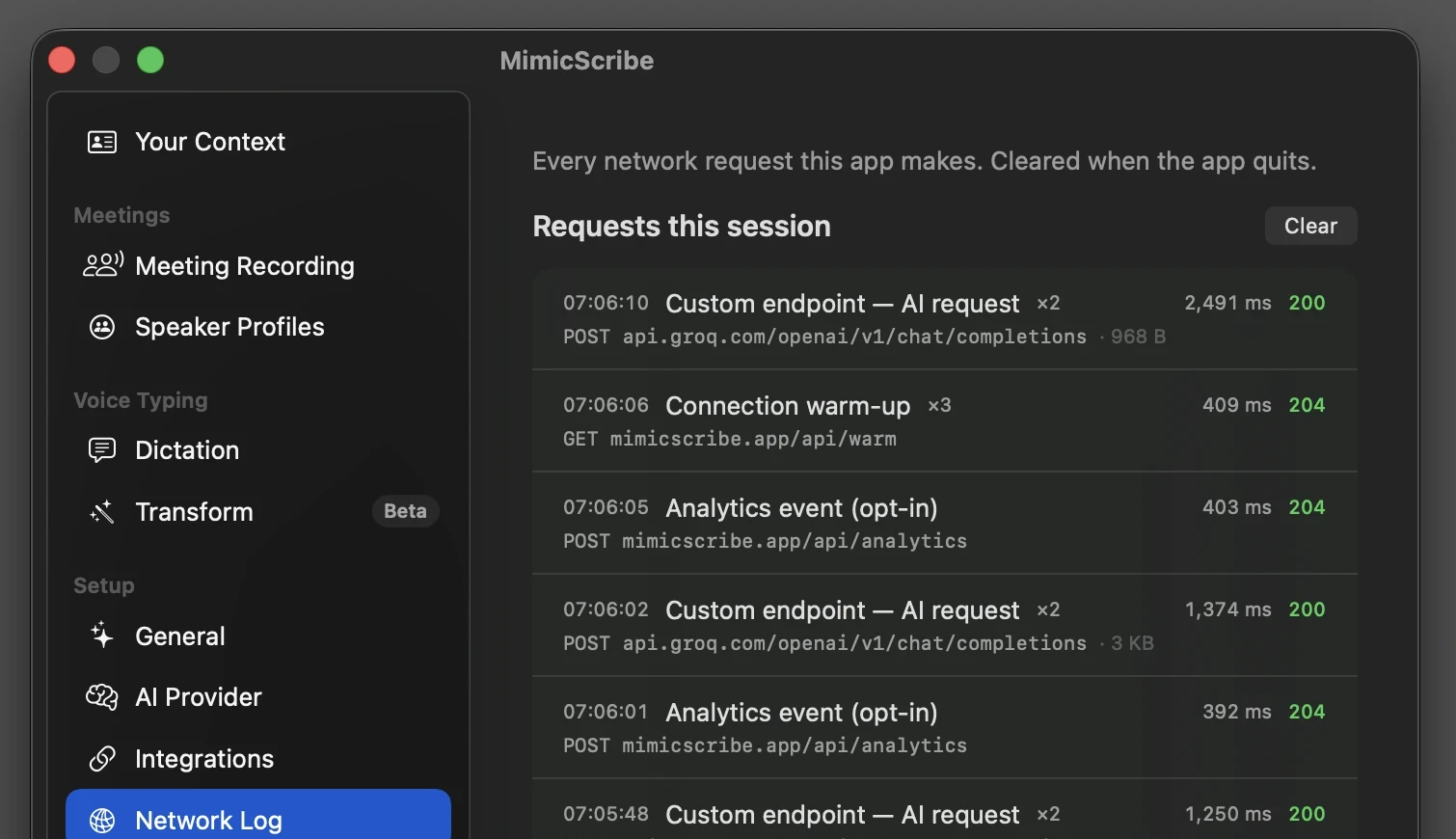
See Every Request
Settings → Network Log lists each request live: what it was for
and where it went. Check with nettop too.
Summary
- MimicScribe performs all speech recognition on-device using Apple's CoreML framework. Your audio never leaves your Mac.
- When you use AI features, transcribed text (never audio) is sent to whichever AI provider you choose. The default is Google's Gemini API through an open-source proxy we operate. You can instead point MimicScribe at any OpenAI-compatible endpoint — a provider your company already trusts (Microsoft Foundry, Amazon Bedrock, your own Gemini key), or a local model on your Mac where the text never leaves it.
- If you use MimicScribe for work, you can point the AI at the provider your company has already approved, on your company's own account. See Using MimicScribe at Work below.
- No account or login is required, so your usage is never tied to your identity.
- There are no usage analytics. Crash and error reporting is chosen during onboarding and can be toggled at any time in Settings.
- A built-in Network Log (Settings → Network Log) shows every request the app sends, live — what it was for, where it went, and when.
- We are compliant with CCPA and GDPR.
- Every release is signed and notarized by Apple, and updates are cryptographically verified before they install — see Security below.
- You can make any meeting Offline to keep its content on your Mac, with no cloud processing.
- You are responsible for obtaining consent from meeting participants where required by law.
What We Do Not Collect
- We do not require an account, login, or email address. Your usage is never linked to your identity.
- We do not upload, stream, or transmit your audio recordings.
- We do not log keystrokes.
- We do not use advertising networks or cross-site tracking.
- We do not sell your data to any third party.
- We do not fingerprint your device. The only device-derived value is a one-way hash of your hardware UUID, used solely for free-tier rate limiting on our proxy. It cannot be reversed to identify your Mac.
How Your Data Flows
This diagram shows exactly what stays on your Mac and what reaches the cloud when you use AI features:
Audio is never sent on any of these paths — only transcript text, and only for the features you route to the cloud. Temporary WAV files used during processing are deleted when the meeting ends. Compressed meeting audio (~14.4 MB/hr) is stored locally on your Mac by default to enable transcript audio playback and speaker identification, automatically pruned after 30 days (configurable in Settings), and never transmitted. If a meeting is Offline, nothing below the dashed line happens — the entire flow stays on your Mac.
Data Processed On-Device
The following data is created and stored exclusively on your Mac and is never transmitted to any server:
- Audio recordings (stored in
~/Library/Application Support/app.mimicscribe/Recordings/, automatically pruned after 30 days by default) - Voice embeddings for speaker recognition — short numerical fingerprints derived from each speaker's voice during a meeting, used to distinguish who is speaking. Created during recording and stored only in your local database.
- Speaker profiles and diarization data
- Search indexes — numerical representations of your meeting content used for search and reference document retrieval. Generated on-device and never transmitted.
- App settings and preferences (stored separately in
~/Library/Preferences/)
Database stored in: ~/Library/Application Support/app.mimicscribe/
Data Sent to External Services
Certain features require communication with external services. By
default, API traffic is routed through an open-source proxy we operate on Cloudflare Workers (mimicscribe.app/api). The proxy is the default, not the only path: you can bypass it
entirely by pointing MimicScribe at any OpenAI-compatible endpoint — a
provider your company already approved (such as Microsoft Foundry,
Amazon Bedrock, or your own Gemini key), or a local model on your Mac
— see Route AI to Your Own Endpoint and Using MimicScribe at Work below. In all cases, only the minimum necessary data is transmitted:
- Gemini API (Google) — via our proxy: When you use AI features (summaries, speaker attribution, meeting assistant,
transform mode, text refinement), the relevant transcribed text is sent
to Google's Gemini API through our Cloudflare Worker proxy. Audio is never
sent. Depending on the feature, the request may also include:
- Your personal context and vocabulary list — included automatically when configured in Preferences
- Relevant sections of reference documents — included only when you have added context sources in Settings and the content matches the current conversation
- Selected text from the active application — sent only when you use voice editing (transform mode) on highlighted text
- Clipboard text — sent only when you explicitly say "clipboard" or "pasteboard" in a voice instruction
Our proxy strips all identity headers before forwarding requests to Google — Google does not receive your device identifier or license key.
- Device identifier: Free users are identified by a one-way SHA-256 hash of the hardware UUID. This hash is used solely for rate limiting and free-tier usage tracking on our proxy. It is not shared with Google or any other third party.
- Usage reporting: For paid subscribers, aggregate token usage (token counts, feature name, model, and billing period — no transcript content) is reported to our server periodically for billing purposes.
- License validation: Subscription license keys are validated against our server on app launch and periodically. No personal data beyond the license key is sent. Billing and checkout are handled by Stripe.
- App Updates (Sparkle): MimicScribe checks for updates daily using the Sparkle framework. The update request includes a standard User-Agent header containing the app version, macOS version, and system locale. Your IP address may be logged by the update server.
- No usage analytics: The app does not report which features you use, when, or how often. (Requests you send through our cloud AI proxy carry the billing metadata described under API traffic, which is needed to meter plans.)
- Crash and error reports (opt-in): This is off by default. When it is off and the app crashes, the next launch shows a notice asking whether to send that crash report; nothing is sent unless you choose Send. Other error events are sent only while the setting is on. When enabled, the app collects these kinds of stability data: anonymous crash reports macOS writes for the app (exception type, signal, and the top stack frames as function names + offsets; exception reason text and file paths are removed); crash and hang/CPU metric reports delivered by Apple's MetricKit framework the day after they occur; on the next launch following an unhandled exception, a one-shot envelope containing the exception name and the top stack frames (function names + offsets); and a degraded-transcript diagnostic when a recording's transcription or speaker processing fails to produce a complete transcript; and error events — a fixed event name with categorical codes (for example, that a model failed to load, a meeting failed to save, or the app stopped responding, with an error class name or a duration). Every report includes the app and build version, build channel, OS version, and an anonymous one-way hash of your hardware identifier — which lets a device's reports be grouped and a developer's own test builds be told apart from real ones. That hash uses a different salt than the billing identifier, so the two cannot be correlated. The exception envelope deliberately omits the exception reason string, since Cocoa runtime exceptions can embed object descriptions that may include user content; the degraded-transcript diagnostic carries only categorical reasons, counts, and flags (for example, which processing stage fell short and whether the audio was preserved). No transcripts, file paths, or user content are included. Crash diagnostics can be disabled at any time in Settings and are automatically deleted after 90 days.
- Pre-consent buffering: Crash and error reports that occur before you reach the privacy screen during onboarding (for example, a model download failure on first launch) are held in a local file on your machine and never transmitted. When you finish onboarding, your choice is honored: if reporting is on, the buffer is sent to our server; if it is off, the buffer is deleted without sending anything.
- Model downloads: On first launch, the speech recognition, speaker diarization, echo cancellation and multilingual search models (~1.2 GB) are downloaded from a remote server and cached locally. No personal data is sent during the download.
Offline meetings
When a meeting is Offline (the Offline toggle when you start it), its transcript, metadata, and other content are not sent to any cloud service. Speech recognition and speaker separation run on your Mac using CoreML. Cloud AI features (summaries, speaker naming, action items, and the meeting assistant) are off for that meeting. You can still add a summary with AI that runs on your Mac (Apple Intelligence, or a local model on localhost). If your AI endpoint is not on your Mac, the app asks before sending the meeting there. Choosing a cloud summary later also asks first, and the meeting then stops being Offline.
Offline applies to that meeting's content. If crash and error reporting is enabled in Settings, those reports may still be sent — they never include the meeting's transcript, audio, title, or participants. To suppress them too, turn crash and error reports off in Settings.
Settings → Network Log shows every request the app sends, live. Run an offline meeting with it open and no AI requests appear. For independent verification with macOS's
own nettop and lsof tools, and the full inventory of endpoints, see Network Activity.
Route AI to Your Own Endpoint
To take our proxy out of the data path, point MimicScribe at your own endpoint in Settings → AI & Data. There is one mechanism for every case: any address that speaks the OpenAI-compatible API. Depending on what you set it to, that can be:
- A local model — Ollama, LM Studio, or llama.cpp running on your Mac. The transcript text never leaves the machine; combined with on-device transcription, the entire pipeline stays local.
- A hosted provider — Microsoft Foundry (Azure OpenAI), Amazon Bedrock, your own Gemini key, a company gateway, or any OpenAI-compatible service. For work, route to one your company has already approved (see Using MimicScribe at Work).
On any of these, transcript text for the features you route goes to that endpoint instead of our proxy — nothing about the request passes through our infrastructure, and the only credential sent is the one you set (no device identifier or license key). You are responsible for the privacy and security of any endpoint you configure. See On-Device AI for the local-model walkthrough and Custom Endpoint for the full reference.
This affects only transcript text. If you have crash and error reports enabled in Settings, they continue to be sent to our server independent of your AI provider choice. To minimize all contact with our infrastructure, also turn crash and error reports off in Settings.
Using MimicScribe at Work
If your company has a policy about where its data is allowed to go, MimicScribe is built to fit inside it rather than around it. The audio never leaves your Mac on any configuration. What your policy has to cover is where the transcript text goes for AI features, and you choose that.
The strongest fit for a company setting is to route the text AI to a provider your organization has already approved, using a key on your company's own account:
- A company-issued Gemini key — transcript text goes directly to Google under your company's own Google relationship, covered by the terms they have already agreed to.
- A company AI endpoint — Microsoft Foundry (Azure OpenAI), Amazon Bedrock, or any OpenAI-compatible provider or internal gateway your org runs. Transcript text goes to that provider on your company's account.
In both cases MimicScribe is only the capture-and-routing layer, not the AI vendor. The provider holding your transcript text is one your security team has already cleared, so there is no new vendor to review and no data-processing agreement to sign with us. Because the key is yours, you can revoke it, and every AI call stops. And with no account and no server-side copy of your meetings, there is no central store to breach.
You can check this with tools we do not control. A firewall like LuLu (free and open-source) or Little Snitch, or macOS's own nettop -x -p <pid>, shows every live connection the app makes at the system level. The
in-app Settings → Network Log shows the same requests with their
purpose and destination as they happen. With a company endpoint you
will see your provider's address; with a local model, 127.0.0.1; for an offline meeting, nothing at all. For the full walkthrough — including
what to hand your security team — see Can You Use an AI Notetaker at Work? and the Custom Endpoint guide.
Two limits to know about. MimicScribe has no central admin console or audit dashboard. IT can lock where text AI runs with a configuration profile, but nothing reports back to a central console. And a device, software, or recording-consent policy may still apply regardless of where the data goes.
Security
This section covers how the app, the update channel, and your data are protected.
- Signed and notarized builds: Every release is signed with our Apple Developer ID and notarized by Apple before distribution. macOS verifies both before the app runs, so a modified copy will not launch.
- Verified updates: Updates are delivered through the Sparkle framework and signed with an EdDSA key that only we hold. The app checks each update's signature against a public key embedded in the app itself before installing — even a compromised update server cannot push a tampered build.
- A stateless, open-source proxy: The proxy that forwards AI requests to Google has no database and keeps no copies. It strips identity headers, forwards your text, returns the response, and discards everything. The full source is on GitHub.
- A live network log: Settings → Network Log records every request the app sends — purpose,
destination, status, and timing, as it happens. Entries hold metadata
only, never request bodies or credentials, and clear when the app quits.
The two channels with their own networking (update checks and model downloads)
are disclosed in the pane's "Where this app connects" list.
- Encrypted transport: Every network call the app makes uses HTTPS (TLS). The complete list of endpoints and what each one carries is documented on the Network Activity page, along with instructions for inspecting the traffic yourself.
- Local data protection: Your transcripts, recordings, and database live in your macOS user account and are protected by your account's permissions. The database is not separately encrypted — FileVault, which is on by default on modern Macs, provides encryption at rest for everything on disk, including your MimicScribe data. If you share a Mac and have FileVault off, turn it on.
- Reporting a vulnerability: If you find a security issue, email security@mimicscribe.app. We read every report.
Device Permissions
MimicScribe requests the following macOS permissions to function:
- Microphone: Used for speech-to-text transcription. Audio is processed entirely on-device.
- System Audio Recording: Captures audio from video calls during meeting recording. This is audio only — no screen content or video is captured. The audio is processed on-device and stored locally.
- Accessibility (optional): Used by voice editing features to read selected text in the active application and to paste results at the cursor. Not required for meeting recording. Selected text is read only at the moment you invoke a feature. While a recording is active, the app also watches window-focus changes to keep the recording indicator positioned — this reads window positions, not content. If you turn on automatic recording, which is off by default, MimicScribe also checks the window titles of apps that are playing audio and the address bar of the frontmost browser window, so it can tell that a meeting has started. That check necessarily runs outside an active recording, and only while automatic recording is enabled. Titles and addresses are matched against your own rules, kept in memory, and never written to disk or transmitted.
Clipboard (voice editing only): At the start of a voice-editing recording, MimicScribe snapshots the clipboard so it can paste the result at your cursor and then restore what was there when the recording ends. Any text on the clipboard is read into memory at that moment, but it is included in the AI request only if you explicitly say "clipboard" or "pasteboard" in your instruction — otherwise it is discarded without being transmitted. Images on the clipboard are never read or sent. The clipboard is not accessed during meeting recording.
Recording Consent
MimicScribe can record system audio and microphone input during meetings. Recording laws vary by jurisdiction — some require consent from all participants, others require consent from only one party.
You are solely responsible for obtaining any required consent from meeting participants before recording. This includes complying with federal, state, and local wiretapping and eavesdropping laws that apply to your situation.
MimicScribe does not notify meeting participants that a recording is in progress. If you are unsure whether consent is required, we recommend informing all participants before you begin recording.
Data Retention & Your Rights
All on-device data — including audio recordings, transcriptions, meeting records, and speaker profiles — is stored locally and remains entirely under your control. You can delete individual records from within the app or remove all data at once by deleting:
~/Library/Application Support/app.mimicscribe/(database, templates, and local audio recordings)~/Documents/MimicScribe/(legacy audio recordings, if created by pre-v1.0 versions)
Because your data lives on your device, you don't need to send us a data access request. You already have it.
Regulatory Rights (GDPR & CCPA)
Because nearly all your data lives on your device, most privacy rights are satisfied by default — you can access, export, correct, or delete your data at any time without contacting us.
If you route AI features to your own Gemini key, a company-approved endpoint, or a local model, the transcript text for those features does not reach our servers at all — that data relationship is between you (or your organization) and the provider you chose, and MimicScribe is neither its controller nor its processor. For the limited data that does pass through our servers on the default path (transcript text sent to Gemini via our proxy, and aggregate usage counts for billing):
- We do not sell or share personal information for advertising.
- Our proxy does not log transcript content. Requests are forwarded to Google with identity headers stripped, then discarded.
- We process data based on your consent (crash and error reports) and legitimate interest (providing the service). On-device processing does not involve the transfer of personal data to us.
- When AI features send text to Google's Gemini API, data is processed statelessly and is not used to train Google's models, in accordance with their API terms of service. No audio or voice data is transferred outside your device.
To exercise any regulatory rights or ask questions, contact us at legal@mimicscribe.app.
Third-Party Services
The following third-party services may process data on our behalf:
| Service | Purpose | Data Processed |
|---|---|---|
| Google Gemini | AI text processing | Transcribed text, selected text, clipboard text (per feature use; no audio or images). Processed statelessly; not used for model training. |
| Cloudflare | API proxy, hosting, CDN | API traffic (Gemini, billing, crash reports); web request data. AI traffic bypasses Cloudflare when using your own API key or a custom endpoint. |
| Stripe | Billing & subscriptions | License key, payment and account information |
| Sparkle | App updates | IP address, User-Agent (app version, macOS version, locale) |
| PromoteKit | Affiliate attribution (website only) | Referral ID from ?via= URL parameter, set as a first-party
cookie on your browser so the affiliate who referred you is credited
if you subscribe. No personal information is collected by this script
— only the referral identifier and timestamp. |
A custom AI endpoint you configure yourself — a company-approved provider, an internal gateway, or a local model — is not one of our subprocessors. We do not operate it, receive data from it, or have any agreement with it on your behalf; the relationship is yours (or your organization's) with that provider. See Using MimicScribe at Work.
Cookies
This website uses only the following cookies:
- Feedback session: anonymous session identifier for the feedback board (so your vote or post can be attributed back to you on the same device without creating an account).
- Admin authentication: set only if you log in as an admin on the feedback board.
- Affiliate referral (PromoteKit): if you arrived via an affiliate link (a URL containing
?via=), a first-party cookie stores the referrer's ID so they receive commission if you subsequently subscribe. The cookie contains no personal information and expires after 60 days. Blocking it has no effect on your ability to use the site; only affiliate attribution is lost.
We do not use analytics, advertising, or cross-site tracking cookies. When you download the app from this site, we record the app version, the time, and a one-way hash of your IP address to count downloads; the hash is removed after 90 days and no cookie is set.
Contact
Questions about this policy? Email us at legal@mimicscribe.app.
Last updated: October 5, 2026